


Track What Matters in Xero
Turn Everyday Expenses Into Better Farming Decisions
A Practical Approach to Measuring Production Inputs
Most farming businesses are already recording expenses such as fuel, fertiliser, electricity and chemicals in Xero. But often, the quantity being purchased is not being captured.
By adding purchases (i.e. supplier accounts) using Xero Bill's, you can use Xero not only to track dollars spent, but also to monitor the physical quantities that drive production decisions.
This approach involves entering the Qty field & Unit Price:
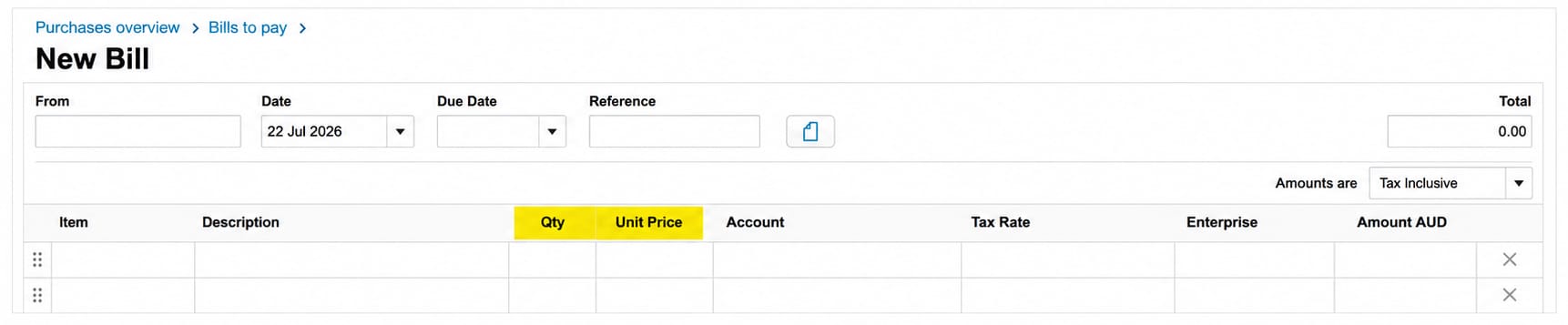
With supplier invoices already containing much of the information you need, attaching them to Xero transactions is a simple habit that can deliver long-term benefits.
As Xero's reporting capabilities continue to expand, having these records stored alongside your transactions helps build a richer source of production data for future analysis and decision-making.
Why Track Quantities?
Understanding what you spend is important.
Understanding how much you use is even more valuable.
Examples
Move Beyond Dollars
A rise in fuel expenditure may not necessarily mean costs are increasing.
For example:
At first glance, costs have increased by $10,000.
However, quantity reporting shows fuel usage increased by 25%, providing a much clearer picture of operational activity.
Capturing quantities helps tell the full story.
We appreciate that you may already use programs such as AgriWebb, FarmMap or PAM to track production data. Our view is that there is added value in recording key quantities within Xero, allowing production and financial information to be held in one place and improving data accuracy between systems.
What Does This Look Like in Xero?
When entering a supplier bill, simply use the:
Quantity (Qty) Field
Example:

Attaching supplier invoices further strengthens the value of the information by providing easy access to supporting documentation whenever required.
💡 Tip: To avoid GST rounding issues, use Xero's inbuilt calculator to work out the unit price.
Example:
If the invoice total is $14,025 and the quantity is 8,500 tonnes, enter:
14025 ÷ 8,500
Xero will automatically calculate the correct unit price and ensure the invoice total reconciles exactly.
How Can This Help Your Business?
Better Production Decisions
Track trends over time and compare seasons.
Benchmark Performance
Review litres, tonnes or units used against production outcomes.
Identify Cost Drivers
Separate price changes from actual volume changes.
Budgeting & Forecasting
Use historical quantity data to build more reliable forecasts.
Support Management Reporting
Useful for discussions with advisers, lenders and business partners.
Improve Accuracy
Reduces reliance on estimates and spreadsheets maintained outside Xero.
Our Recommended Starting Point
We suggest implementing this approach for expenses where quantity has a significant influence on production outcomes:
Priority Areas
- Fuel (litres)
- Fertiliser (tonnes / kilograms)
- Electricity (kWh)
- Seed
- Livestock feed
Once established, the same method can be expanded to other key inputs relevant to your business.
💡 Tip: If you have multiple electricity accounts, consider setting up a separate account called "Electricity – Irrigation".
This allows you to specifically track the electricity costs and usage most closely linked to production outcomes, without needing to record quantities across every electricity account.
Unlock More Value from Your Data – Xero Reports
By using Xero's Qty field, you can access detailed reporting through the Payables Invoice Detail Report, allowing you to review quantities alongside invoice dates, payment dates, descriptions, unit prices and transaction values.
The report can also be filtered by supplier or expense category, making it easy to analyse specific inputs such as fuel, fertiliser or electricity over time.
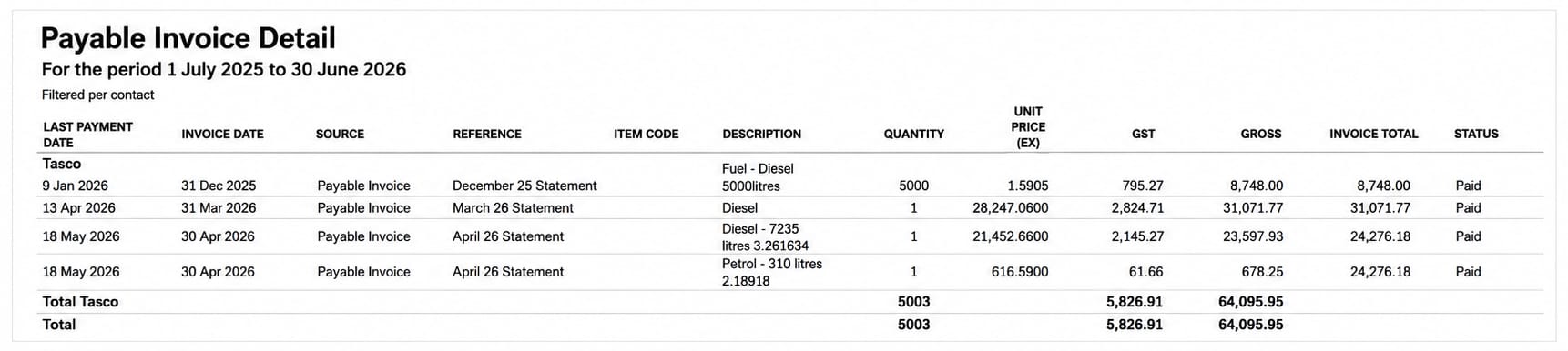
Many businesses already include quantities in the transaction description, and that's a great start. However, using Xero's dedicated Quantity field takes things one step further, turning that information into meaningful data that can be reported on, analysed and used to support better production decisions.
Small Change. Powerful Information.
Most supplier invoices already contain quantity information. If you're already uploading and processing bills in Xero, much of the work is already being done.
Taking a few extra seconds to record quantities can create a valuable source of production data that builds year after year.
The result?
✅ Better reporting
✅ Better benchmarking
✅ Better conversations
✅ Better decisions

Related Insights

CGT Reform 2027: What you need to know
CGT Reform 2027: What you need to know
From 1 July 2027, CGT rules change for property and other assets. Learn what’s changing, why valuations matter and how to prepare.

Murray Nankivell appoints two new Associate Directors
Murray Nankivell appoints two new Associate Directors
Murray Nankivell appoints Hamish Watson and William Altmann as Associate Directors, recognising their expertise and commitment to clients.

Tim Mason appointed Director of Murray Nankivell Financial Planning
Tim Mason appointed Director of Murray Nankivell Financial Planning
Tim Mason has been appointed Director of Murray Nankivell Financial Planning, recognising his experience, leadership and client focus.
We are here for you
We look forward to working with you to help you achieve a better financial future. Let us guide you on the path to financial success.
Contact your preferred Murray Nankivell office today.